
Microsoft Loop
Think, plan, and create together
Designed for co-creation, it brings your team and ideas together in one place.

microsoft loop
One workspace. Three powerful ways to collaborate.

Loop Components
Add dynamic components like tasks, tables and more to your content.
Loop Pages
Create flexible pages for ideas, plans and projects.

Loop Workspaces
Bring everything together in one shared workspace.
Get started easily
Quickly kick off projects with intelligent suggestions, page templates, and an insert menu at your fingertips to easily add what you need to work together.
Easily insert items in the flow of your page
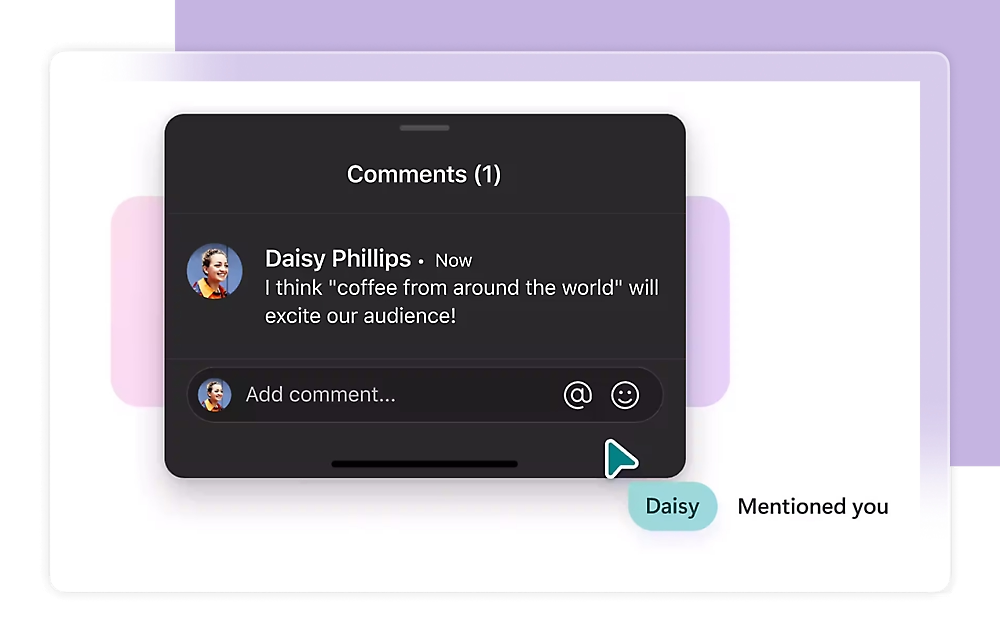
Quickly add what you need in Loop pages. Insert components, @mention a teammate, or add an emoji or important date.
Save time with page templates
Use page templates to quickly provide context for your project, take meaningful notes, or make a team decision.
Unlock the power of shared thinking with Copilot in Loop
Copilot in Loop helps you cocreate, stay up to date, and pick up where others left off.
Work together wherever, whenever
Communicate ideas, collaborate, and stay in touch wherever you are, regardless of time zone differences, commutes, and work style preferences.
Stay in control
Get only the notifications you care about and stay focused on what needs your attention.

Time to transform your work together
Enjoy online security, innovative apps like Loop, and cloud storage across your devices and on the web with Microsoft 365.

why loop?
Everything your team needs to move forward
Microsoft Loop connects people, ideas and tasks in one workspace, making teamwork and project collaboration easier.

Templates
Get started quickly with ready-to-use templates.

Real-time collaboration
Work together at the same time, from anywhere.

Tasks and notifications
Stay on track with built-in tasks and reminders.

Copilot in Loop
Turn ideas into action with AI-powered assistance.
Turn shared thinking into progress
With Copilot in Loop, get AI-powered help to summarise, brainstorm and turn ideas into actionable plans.
microsoft loop
How Teams use Loop

Project planning
Plan milestones, track progress and keep everyone aligned.

Meeting notes
Capture key points and turn them into action items.

Team decisions
Discuss options and document decisions in one place.

Licensing & Availability
Available with eligible Microsoft 365 plans; feautures and limits depend on your subscription.
frequently asked questions
Additional Informations
Find answers to common questions and explore additional information about Microsoft Loop, its features, and licensing.
Known issues
Note: Microsoft Loop doesn't support external sharing for guests or external users; plans to build these features are in progress.
There are a few known issues with the Loop app. We'll work to keep this page updated as we identify and fix issues.
-
Error: Oops! We couldn't save the Loop workspace and pages you've created.They'll be lost as soon as you refresh or navigate away from this page. Copy anything from them you want to keep and paste it somewhere else. Then, please try to create this workspace again.
-
Possible solutions (using Loop with your Microsoft Account):
-
You need to sign into outlook.com with your Microsoft Account. Once you've signed in one time, everything that Loop needs from Outlook can be set up the next time you try to use Loop.
-
-
Possible solutions (using Loop with your Organization ID):
-
You need to have an Exchange Online mailbox associated with your Organization ID. Once you've been provisioned an Exchange Online mailbox, and you've signed into it one time, everything that Loop needs from Exchange Online can be set up the next time you try to use Loop. Work with your Microsoft 365 administrator or your help desk to ensure you have an active Exchange Online mailbox.
-
You need to have at least read access to your organization's SharePoint Online root site. We are working on a long-term solution to not require this. Until then, work with your Microsoft 365 administrator or your help desk to ensure you have a minimum of read access to the root site.
-
-
Where can I use Loop?
You can use the Loop app on the web, iOS, and Android.
You can use Loop components in Teams, Outlook, Word for the web, and Whiteboard.
Does Loop cost money and are there limits to using Loop?
Loop does not cost any money during the public preview. There are some limits during the public preview, which you can learn more about here.
How do I enable Loop for my organization?
Check out the instructions in our blog: Learn how to enable the Microsoft Loop app.